
4326 social-studies results | sort by:
 return to subject listing
CheckiO - CheckiO
Grades
3 to 12
tag(s): coding (111), critical thinking (190), problem solving (285)
In the Classroom
Allow students use a variety of different types of coding. Use this site to learn Python. Once students have used several different coding sites, discuss what they learned from the process. Brainstorm and discuss the following: What is the use of learning coding? What are the similarities and differences of the various coding platforms? Use an online interactive Two or Three-Circle Venn Diagram, reviewed here, and here, for the comparisons of the coding programs.You must be registered and logged in to add items to your favorites.
Use the form at the top of the page to log in, or click here to join TeachersFirst (it's free!).
Langscape - Maryland Language Science Center
Grades
3 to 12tag(s): arabic (12), chinese (40), cultures (302), french (74), german (51), greek (46), hebrew (18), italian (33), landforms (38), latin (23), map skills (68), maps (221), phrases (5), portuguese (21), russian (27), spanish (113)
In the Classroom
Bookmark Langscape for any lessons about other countries. Locate countries on the map then listen to the audio files of the spoken language. Create a link on classroom computers for students to play the language game. Take advantage of the many lesson ideas found in the educators guide.Add your comments below (available only to members) | Become a Member
You must be registered and logged in to add items to your favorites.
Use the form at the top of the page to log in, or click here to join TeachersFirst (it's free!).
Creating a Rubric: Tutorial - University of South Florida Health
Grades
4 to 12tag(s): assessment (142), professional development (307), rubrics (39)
In the Classroom
Bookmark this site for use when creating a rubric of any kind. Share with students and have them set up their own rubrics, based on the requirements, for projects. Doing this may help clarify the requirements. Be sure to check out other TeachersFirst Rubrics resources here.Add your comments below (available only to members) | Become a Member
You must be registered and logged in to add items to your favorites.
Use the form at the top of the page to log in, or click here to join TeachersFirst (it's free!).
Oakland Schools Standards Alignment Atlas - Oakland Schools, Michigan
Grades
K to 12tag(s): commoncore (63), professional development (307)
In the Classroom
Bookmark this site for use throughout the year to plan and teach lessons using Common Core Standards. Use this site as a guide when developing yearly plans for implementing Common Core Standards in your classroom. Share with school administrators and leaders as a reference for planning.Add your comments below (available only to members) | Become a Member
You must be registered and logged in to add items to your favorites.
Use the form at the top of the page to log in, or click here to join TeachersFirst (it's free!).
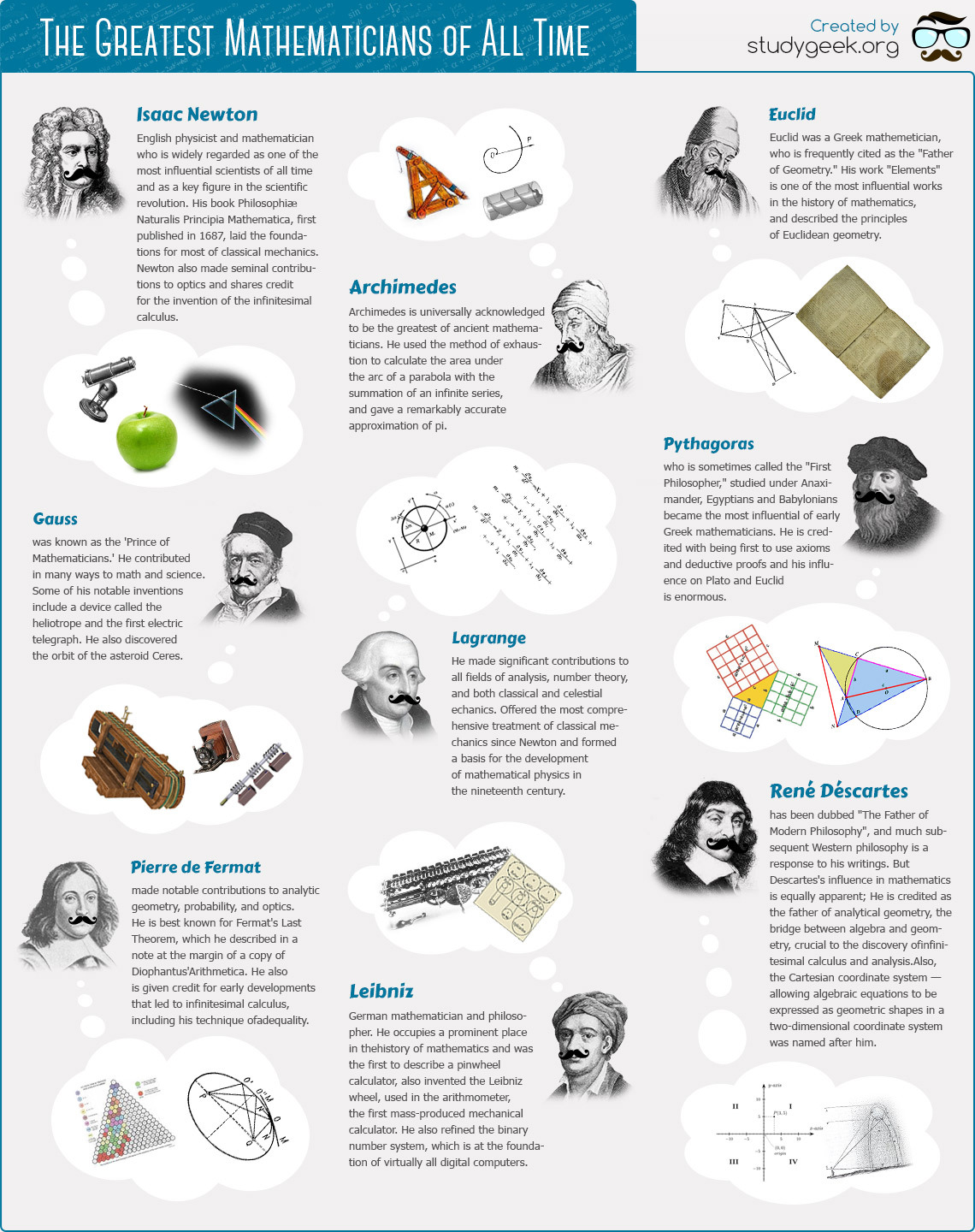
The Greatest Mathematicians of All Time - StudyGeek
Grades
6 to 12tag(s): biographies (102), famous people (40), newton (25), pythagorean theorem (19)
In the Classroom
Download this graphic and have it printed for use as a poster in your classroom. Display the graphic on your interactive whiteboard as an introduction to famous mathematicians. Have students research each mathematician and share their findings in presentations with a tool like Google Slides, reviewed here.Add your comments below (available only to members) | Become a Member
You must be registered and logged in to add items to your favorites.
Use the form at the top of the page to log in, or click here to join TeachersFirst (it's free!).
Intel Teach Elements - Online Professional Development Courses - Intel
Grades
K to 12tag(s): professional development (307)
In the Classroom
Gain a better understanding of digital learning tools and techniques by taking Intel's professional development courses. Share with other faculty members as part of your school's professional development. Take a course together with fellow staff members and discuss content and how it works in your teaching situation.Add your comments below (available only to members) | Become a Member
You must be registered and logged in to add items to your favorites.
Use the form at the top of the page to log in, or click here to join TeachersFirst (it's free!).
How the Five Major Religions Spread Across the World - Business Insider
Grades
5 to 12This site includes advertising.
In the Classroom
Give a basic overview of the timeline and events leading to each of the major religions in the world. Use as a resource to examine the cultural effects of a single person starting each religion and the reasons why the religion spread. Analyze the reasons leading to the spread of each religion. Use this in conjunction with a unit on explorers. The video is slow to load, so preload and check before using in class.Add your comments below (available only to members) | Become a Member
You must be registered and logged in to add items to your favorites.
Use the form at the top of the page to log in, or click here to join TeachersFirst (it's free!).
Kartveli: Innovator in Aviation - Aviation Media LLC
Grades
6 to 12tag(s): aircraft (25), aviation (52), design (76), engineering (139)
In the Classroom
Introduce this site on an interactive whiteboard or projector as part of a career or technology unit. Then have students explore this site independently or in small groups. This is a great find for gifted students to discover lesser-known pioneers in aviation. Have students use Fakebook, reviewed here, to create a "fake" page similar in style to Facebook about Alexander Kartveli or his peers.Add your comments below (available only to members) | Become a Member
You must be registered and logged in to add items to your favorites.
Use the form at the top of the page to log in, or click here to join TeachersFirst (it's free!).
Acclaim - Aksel Gongor, MyAcclaim, LLC
Grades
6 to 12This site includes advertising.
tag(s): teaching strategies (88)
In the Classroom
Acclaim is a terrific tool for any teacher who likes to show and discuss certain aspects of videos in class. No more talking over the video or pausing to ask a question or make a comment. Use Acclaim in class to pause and have the discussion questions visible from the video. This works exceptionally well if you're in a blended classroom or want to flip a lesson and have students watch the video from home and be prepared to discuss in class, or if you use stations in your classroom. Students can also put in questions for clarification at the time they are watching. Share Acclaim with research groups for uploading documents and videos they are thinking of using in presentations and projects. Physical education teachers will find Acclaim useful to pause and review certain aspects of a game or exercise you've recorded. Share the URL via email or post to your website or blog.Edge Features:
Includes an education-only area for teachers and students
Parent permission advised before posting student work created using this tool
Includes social features, such as "friends," comments, ratings by others
Requires registration/log-in (WITH email)
Premium version (not free) includes additional features or storage
Products can be shared by URL
Multiple users can collaborate on the same project
Includes teacher tools for registering and/or monitoring students
Add your comments below (available only to members) | Become a Member
You must be registered and logged in to add items to your favorites.
Use the form at the top of the page to log in, or click here to join TeachersFirst (it's free!).
Pompeii Virtual Tour - Google Maps
Grades
6 to 12tag(s): romans (54), virtual field trips (154), volcanoes (60)
In the Classroom
In the age of shrinking opportunities for field trips, jump right in! This site is perfect for use on an interactive whiteboard as you explore this well-preserved example of ancient Roman life. Enhance learning by having students use Fakebook, reviewed here to create a "fake" page similar in style to Facebook about a day in the life of an inhabitant of Pompeii. As an alternative, enhance learning by having students create blogs using a tool like edublog, reviewed here to reflect what they have learned about ancient Pompeii and Roman life.Add your comments below (available only to members) | Become a Member
You must be registered and logged in to add items to your favorites.
Use the form at the top of the page to log in, or click here to join TeachersFirst (it's free!).
State of the Union Bingo - National Constitution Center
Grades
7 to 12tag(s): presidents (154), speeches (21)
In the Classroom
Take advantage of this free lesson plan as a supplement to your current events lessons. The Bingo sheet was created in 2012, you may need to modify some terms to adapt to current events. Divide students into groups and compare State of the Union addresses from throughout any one president's terms. Have students create a simple infographic sharing their findings using Venngage, reviewed here.Add your comments below (available only to members) | Become a Member
You must be registered and logged in to add items to your favorites.
Use the form at the top of the page to log in, or click here to join TeachersFirst (it's free!).
Andrew Carnegie's Story - Carnegie Corporation of New York
Grades
7 to 12tag(s): 1900s (87), biographies (102), business (51), railroads (17)
In the Classroom
Introduce this site on your interactive whiteboard or projector. Then have students explore this site independently or in small groups. Include this resource with a study of the 19th Century, famous businessmen, or philanthropy. Have students create maps of libraries in your state funded by the Carnegie Foundation using MapHub, reviewed here. Students can add text, images, and location stops! Have students use Fakebook, reviewed here, to create a "fake" page similar in style to Facebook about Andrew Carnegie and his peers. Use this site as a starting point to compare Andrew Carnegie to current businessmen and philanthropists such as Bill Gates and Warren Buffet.Add your comments below (available only to members) | Become a Member
You must be registered and logged in to add items to your favorites.
Use the form at the top of the page to log in, or click here to join TeachersFirst (it's free!).
Classroom Materials - Primary Source Sets - Library of Congress
Grades
4 to 12tag(s): 20th century (170), authors (116), black history (133), civics (141), civil war (148), constitution (110), evaluating sources (58), hispanic (53), history day (37), immigration (87), jefferson (20), lincoln (65), new deal (5), primary sources (178), Research (92), segregation (22), thanksgiving (24), veterans (38), washington (33), westward expansion (42), womens suffrage (65), wright brothers (17)
In the Classroom
When introducing a new unit, show students photos from the era (on the left menu) and have them describe what they see and what period they think it is. Find plenty of questions and activities (including a blank analysis organizer for students) in the Teacher's Guides. Also look at Library of Congress: for Teachers, reviewed here. Encourage your students to use this tool for projects. Challenge students to find a photo (legally permitted for reproduction), and then narrate the photo as if it is a news report. Have students create a multimedia presentation using Google Slides, reviewed here. Google Slides allows you to narrate a picture (choose Insert from the top menu, then audio) modifying student learning. Include this site on your class webpage for students and parents to access as a reference.Add your comments below (available only to members) | Become a Member
You must be registered and logged in to add items to your favorites.
Use the form at the top of the page to log in, or click here to join TeachersFirst (it's free!).
Technology Integration Matrix - Florida Center for Instructional Technology
Grades
K to 12tag(s): rubrics (39)
In the Classroom
Use the matrix to evaluate how you use technology in your classroom. Share with administrators and peers as part of your ongoing professional development. View videos to understand different ways to incorporate technology in your classroom.Add your comments below (available only to members) | Become a Member
You must be registered and logged in to add items to your favorites.
Use the form at the top of the page to log in, or click here to join TeachersFirst (it's free!).
Freemake Video Converter - Ellora Assets Corporation
Grades
K to 12tag(s): conversions (34), images (276), movies (51), multimedia (71), slides (40)
In the Classroom
Share with students for use with any multimedia or presentation project. Use this tool to back up videos on your YouTube channel. Bookmark and save this video converter for use as an alternative to Online-Convert, reviewed here. This tool and Online-Convert are both used to download and save videos at home that you wish to show to students, especially if they are blocked at school. If you want to use the video at school, you may need to save the conversion to a USB stick if a CD drive isn't available.Add your comments below (available only to members) | Become a Member
You must be registered and logged in to add items to your favorites.
Use the form at the top of the page to log in, or click here to join TeachersFirst (it's free!).
Fotojet - PearlMountain Technology Co., Ltd
Grades
K to 12tag(s): artificial intelligence (359), collages (17), graphic design (57), images (276), posters (44)
In the Classroom
Create cards, posters, or photo collages for any classroom presentation. Share what you created on your website or blog for students to review or for students who were absent. In the younger grades, teachers would create the project. Have students create presentations to "introduce" themselves to the class during the first week of school. Link or embed the introduction presentations on your class wiki and have others guess who they are about. Use this tool in your 1:1 art class to help students practice design principles and techniques. Share student projects with parents and others via URL. Be sure to demonstrate HOW to use this tool on your interactive whiteboard or projector.Add your comments below (available only to members) | Become a Member
You must be registered and logged in to add items to your favorites.
Use the form at the top of the page to log in, or click here to join TeachersFirst (it's free!).
Global Post - Philip S. Balboni
Grades
6 to 12This site includes advertising.
tag(s): journalism (72), newspapers (86)
In the Classroom
Broaden student perspectives about world issues by sharing articles from Global Post on an interactive whiteboard or projector as part of current events lessons. Create a link to this site on classroom computers and have students read and share articles with the class. Be sure to add a link to this site on your class webpage for students to access at home. After exploring articles and information in-depth, have students use a tool such as Zeemaps, reviewed here, to give a recap of the article and state their opinion about the topic. Zeemaps allows students to create audio recordings AND choose a location (on a map) where the story takes place.Add your comments below (available only to members) | Become a Member
You must be registered and logged in to add items to your favorites.
Use the form at the top of the page to log in, or click here to join TeachersFirst (it's free!).
40 Maps that Explain the Middle East - Max Fisher
Grades
7 to 12tag(s): iran (7), iraq (26), israel (15), maps (221), middle east (47), religions (120)
In the Classroom
Use this site as an anticipatory set or "activator" to introduce a unit or lesson on a projector or interactive whiteboard. Be sure to include this site on your class webpage for students to access both in and outside of class for further practice. Create a link to these maps on classroom computers for students to explore on their own. Use an online tool such as an Interactive Two Circle Venn Diagram, reviewed here, to compare different countries, religions, or time periods included in the maps.Add your comments below (available only to members) | Become a Member
You must be registered and logged in to add items to your favorites.
Use the form at the top of the page to log in, or click here to join TeachersFirst (it's free!).
Digital Compass - Common Sense Media
Grades
5 to 9tag(s): digital citizenship (112), internet safety (117)
In the Classroom
This site is perfect to incorporate into any digital citizenship lessons. Complete activities together on your interactive whiteboard while making appropriate and inappropriate choices along the way. Create a link on your class website or blog for use at home. Be sure to share Digital Compass with parents to use as part of their online safety discussions at home. Enhance students' learning and create a simple infographic sharing their findings using Canva Infographic Maker, reviewed here.Add your comments below (available only to members) | Become a Member
You must be registered and logged in to add items to your favorites.
Use the form at the top of the page to log in, or click here to join TeachersFirst (it's free!).
Watchkin - Alan Cheney
Grades
K to 12tag(s): internet safety (117)
In the Classroom
How often do you find great clips and video shorts from YouTube and you cannot show them or are afraid to show them even if you can get them through the school filter? Try using this to show clips or long videos to your class via an interactive whiteboard or projector.Add your comments below (available only to members) | Become a Member
You must be registered and logged in to add items to your favorites.
Use the form at the top of the page to log in, or click here to join TeachersFirst (it's free!).
Add your comments below (available only to members) | Become a Member
Close comment form